
In order for Auditoria to attach PDFs of invoices to emails, you first need to enable the attachment of invoices in Sage Intacct. To do this, you need to create a smart event, which will send a copy of the invoice to Auditoria whenever an invoice is created or updated in Sage Intacct. See the procedures below to enable Sage Intacct for invoice attachments.
Create a Smart Event for Order Entry - Sales Invoice
- Go to Platform Services > Smart Event.
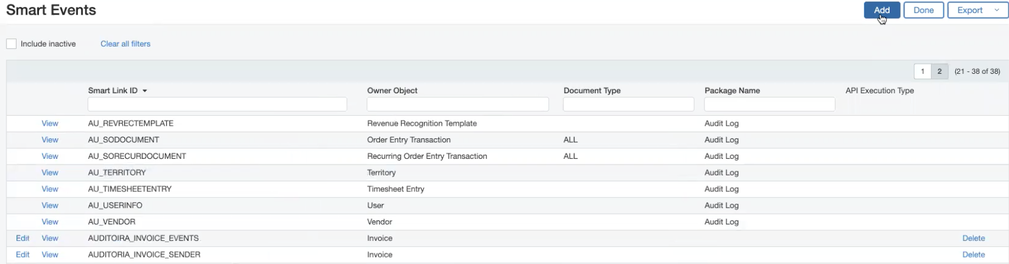
- In the Smart Event page, click Add.
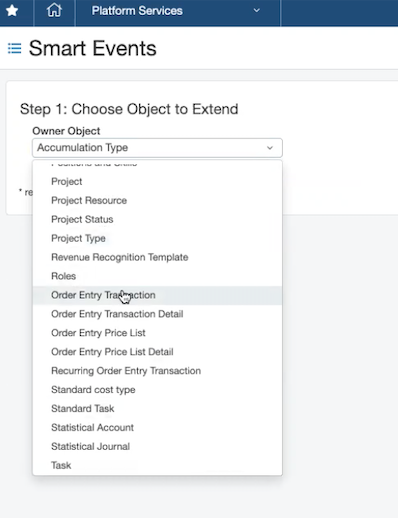
- In the Owner Object pulldown menu of the Step 1: Choose Object to Extend region, select Order Entry Transaction.
- In the Available Items column of the Document Type region, select Sales Order > Sales Invoice.
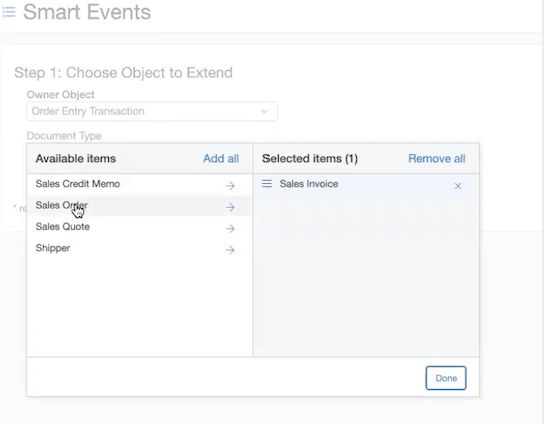
- Click Done.
- In the Step 2: Select event properties page, click Next.
- In the Selected Items column of the Events region, select Add and Set.
- In the Email field of the Step 3: Select email properties page, enter:
- In the Subject field, enter [!SODOCUMENT.DOCNO!]
- Optionally, in the Body field enter [!SODOCUMENT.CUSTOMER.>CUSTOMERID!]
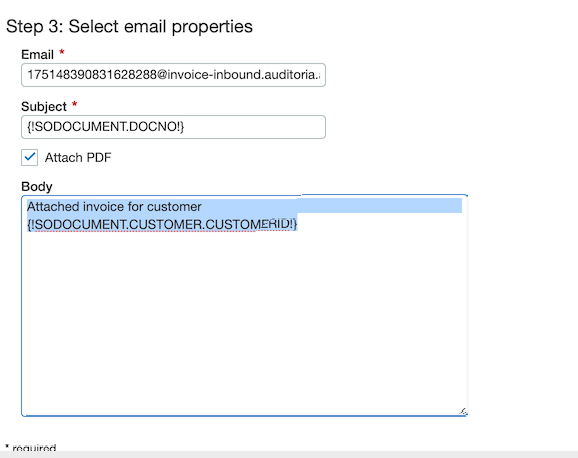
- Click Next.
- In the Smart Link ID field of the Step 4: Select deployment options page, enter an ID.
- Click Save.
Get your Auditoria Source Token
To obtain your Auditoria source token, see Get your Auditoria Source Token.