


1. New and Updated Features
SmartGL: Weighted Average accrual formula added [6226]
In the SmartGL Invoice Accrual process, the Weighted Average accrual formula has been added as an option for POs and PRs. For more information on Auditoria accrual formulas, see Invoice Accrual Formulas.
SmartGL: Straight Line method for remaining term [7830]
During the SmartGL accrual process, the Straight Line method for the remaining term has the beginning of the service period calculation as the first date of the next month. For example, if accruing for an April month end, the beginning of the service period is 5/1/22. For more information on Advanced Accruals, see Invoice Accrual Formulas.
SmartGL: Vendor Details page enhancements [7292]
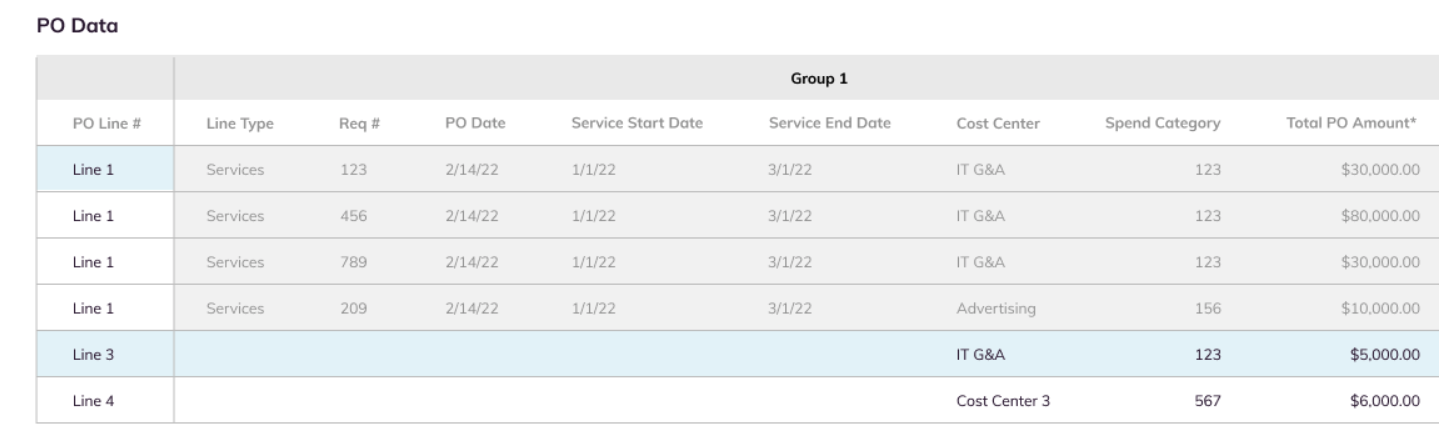
The Vendor Details page has been enhanced to make analysis easier for accrual entries as part of the month end close. Key changes include the following:
- PO Data - the report data section is renamed PO Data and can be easily scrolled to view PO details. The PO Data section can be sorted by PO Number and all columns with values are sortable.
- Line Items - The Line Item section displays a line for each vendor/cost center combination. New PO lines can be added and existing PO lines can be edited.
SmartGL: New options for invoices at PO level [6227]
During the SmartGL process, you can now select invoice options at the PO level, including the Accrual Method for the PO (Straight Line or Weighted Average) and whether the PO should be excluded from the reach out emails.
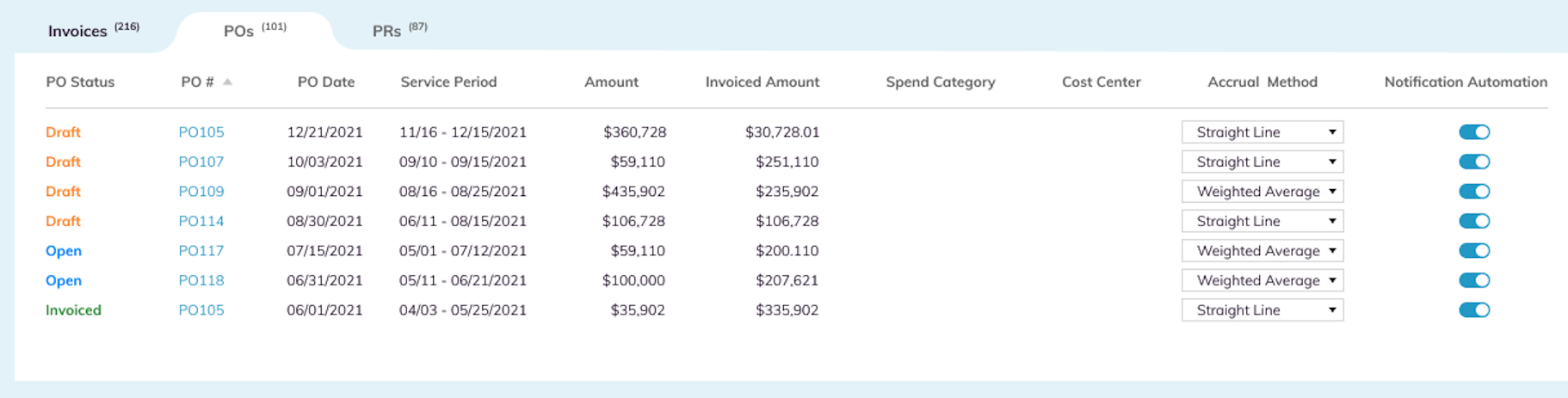
To indicate the accrual method for a PO, go to the POs tab in the Invoices section, and select either Straight Line or Weighted Average in the Accrual Method column pulldown menu for that PO.
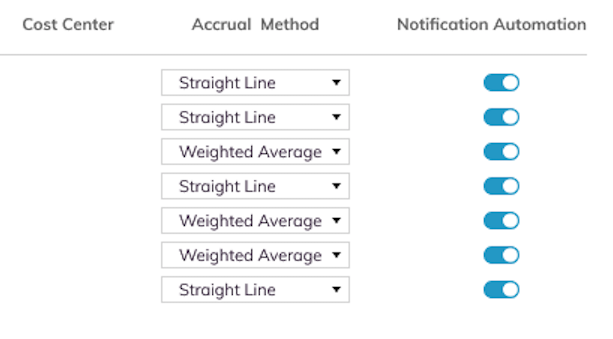
To exclude a PO from receiving a reach out email, turn off the Notification Automation column toggle switch. All POs with the Notification Automation switch On will receive a reach out email.
SmartGL: Invoices with POs managed at PO level [8256]
During the SmartGL process, invoices with purchase orders are now automatically written to the ERP or other application at the PO level to make the POs easier to manage.
SmartGL: Data Management page accrual enhancements [6135]
In the SmartGL Invoice Accrual process at the beginning of accruals reach out, the Data Management page includes a list of all suppliers in their respective Accrual Group and with the reach out email status indicated. Columns are added for accrual group Owner, Classification and Comments.

2. Fixed Bugs
Resolved: Vendor Invoice Data Extraction: Invoice PDF not attached to invoice record [8639]
Resolved: False positive for payment status inquiry [8275]
Resolved: Vendor Invoice Data Extraction: Invoice PDF extraction enhancements [8222]
Resolved: SmartGL: Weighted Average Accrual error [9220]
Resolved: Vendor Invoice Data Extraction: New fields added to extraction [8578]
Resolved: SmartGL: New lines and POs cannot be deleted [9307]
Resolved: SmartGL: Random numbers added to some fields [9308]

3. New Known Bugs
Vendor Invoice Data Extraction: Currency number incorrect in extracted line item [9281]
Symptom: During the Vendor Invoice Data Extraction process, some currency numbers extracted under line items are not correct.
Impact: Customer views incorrect currency numbers.
Workaround: None.