


1. New and Updated Features
SmartCollections: New region in SmartCollections page [7701]
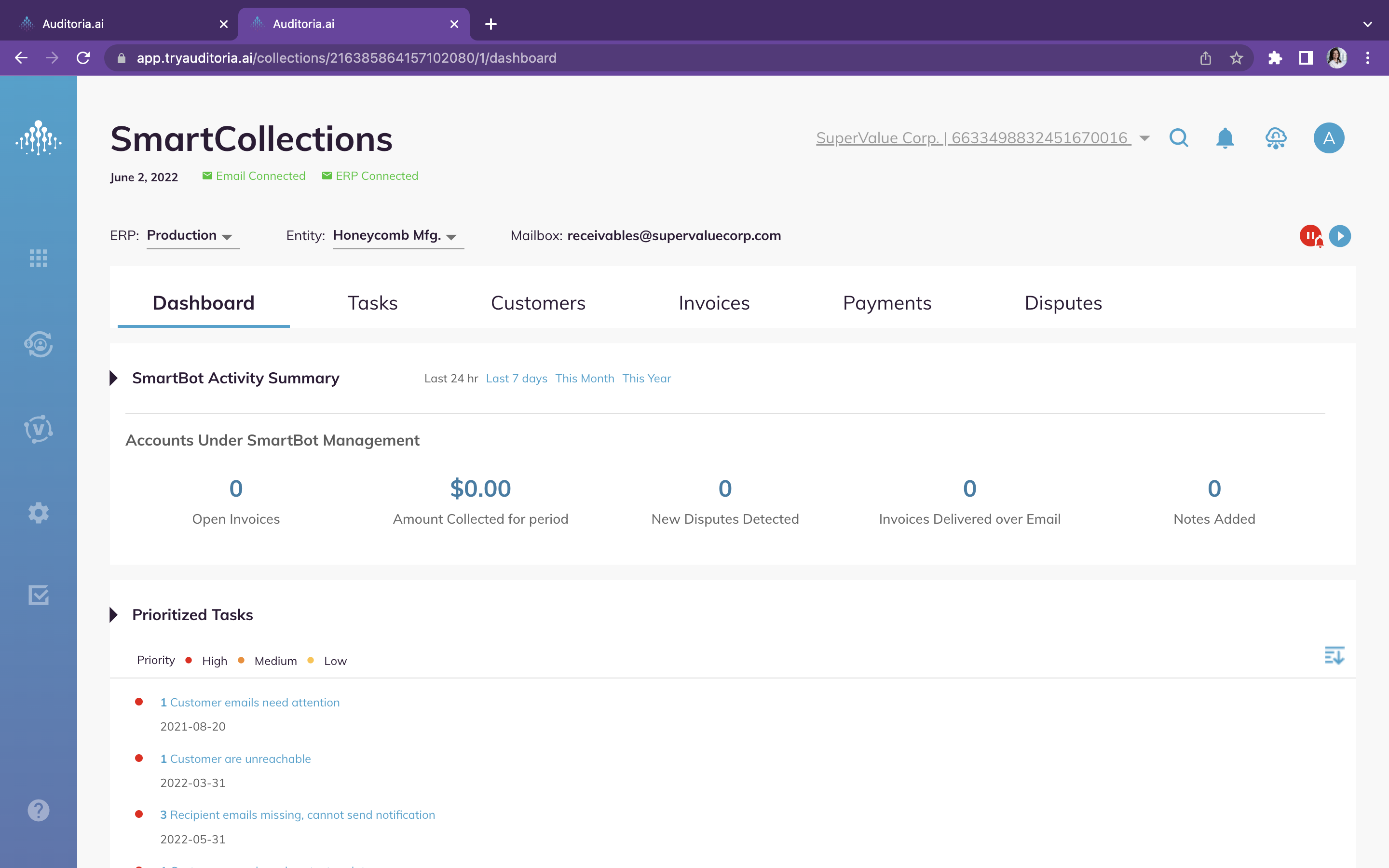
Auditoria SmartCollections pages were updated in the last release with a new Dashboard, navigators for Tasks, Customers, Invoices, Payments, and Disputes. Continuing the SmartCollections console updates, this release includes the SmartBot Activity Summary section which provides metrics on Accounts Under SmartBot Management, including the following:
- Open Invoices
- Amount Collected for Period
- New Disputes Detected
- Invoices Delivered Over Email
- Notes Added
ERP Integration: Export of Customers and Invoices includes Tags [7447]
The export of customer records and invoices to the ERPs from Auditoria also includes the export of any and all tags created on these business objects.
Implementation: Copy of SmartFlow skill settings in new ERP [5188]
The SmartFlow skill settings implemented by your Customer Success Team when connected to an ERP sandbox are automatically saved so that they don't have to be reentered when you connect to ERP production. If you have any questions about this process, ask your Auditoria Customer Success Representative.
Workday Integration: RaaS Reports and Multi-Currency added [7472]
New Vendor and Payment RaaS reports have been added to the Workday ERP integration and Multi-Currency is now supported for Auditoria journal reports. For more information on Auditoria's integration with Workday, see Workday Integration.

2. Fixed Bugs
Resolved: SmartCollections: ERP tags not appearing in Customer Explorer [8661]
Resolved: SmartCollections: Changing tenants only take effect when menu double-clicked [8787]
Resolved: SmartCollections: Changing user roles only takes effect when menu double-clicked [8786]
Resolved: Vendor Invoice Data Extraction: Net Amount data extraction failure [8638]
Resolved: Vendor Invoice Data Extraction: Line Item data extraction failure [8633]
Resolved: Vendor Invoice Data Extraction: Amount Due data extraction failure [8632]

3. New Known Bugs
SmartCollections: Dunning notifications not appearing for invoices. [8771]
Symptom: During the SmartCollections flow, dunning notifications appear for a customer but not for a customer's invoice. The dunning notifications must appear for both customers and invoices.
Impact: Dunning notification not received.
Workaround: None.
SmartCollections: SmartBot responses to customers are incorrect. [8770]
Symptom: During the SmartCollections flow, some SmartBot emails to customers do not contain the correct information.
Impact: Customer receiving inaccurate SmartBot responses.
Workaround: None.