
For the Auditoria Customer Success team to review Oracle NetSuite configurations and perform data integrity checks in Oracle NetSuite, a business user for Auditoria must be set up with a defined set of permissions. When determining which permissions are required for setup with a System of Record (SoR), all of the standard fields are included in the listed permissions. If a customer requests an extended field through mapping, they must update the permissions to enable Auditoria SmartBots access.
See the procedure below set up your Oracle NetSuite Business User permissions.
Set Up Oracle NetSuite Business User Permissions for Auditoria
- For access to the A/R Aging reports to validate the AR information in the system, go to Reports > Recent Reports > A/R Aging Detail and enable this permission.
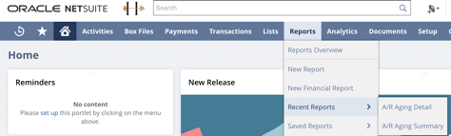
- To complete access to the A/R Aging reports, go to Reports > Recent Reports > A/R Aging Summary and enable this permission.
- Assign an A/R Clerk role to the business user and customize it to include the following permissions:
- Lists > Customers > View
- Lists > Vendors > View
- Lists > Currency > View
- Lists > Subsidiaries > View
- Lists > Resource > View
- Lists > Accounts > View
- Lists > System Email Template > Full
- Transactions > Customer Payment > Edit
- Transactions > Vendor Payment Status > View
- Transactions > Purchase Order > View
- Transactions > Make Journal Entry > Edit
- Transactions > Invoice > View
- Transactions > Bills > View
- Transactions > Credit Memo > View
- Setup > Workflow > Full