


1. New and Updated Features
AP Helpdesk: Vendor classifications added [6521]
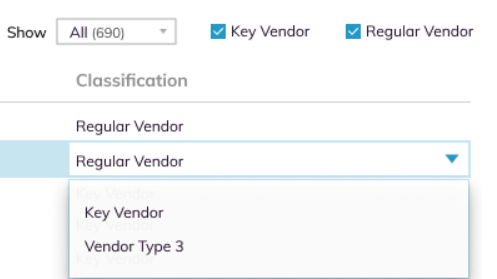
The attribute of Vendor Classification has been added to enable Auditoria SmartBots to determine what type of vendor is requesting information. The Vendor Classification is selected in the pulldown menu on the SmartVendor page. Each vendor must have only one classification. Customers can create groups to classify the vendors, assign to vendors, edit the names of the classifications, and change the assignment.
SmartGL: British MOT expenses result in No VAT Input [8292]
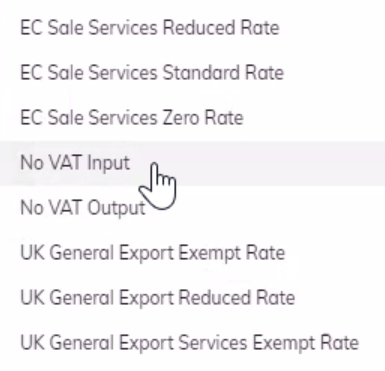
In the United Kingdom, MOT expenses from vehicle inspections are exempt from sales tax and any UK vendor line item for MOT will default to zero taxes. All MOT line items will display the tax rate No VAT Input.
SmartGL: Estimated Accrual amount added [7386]
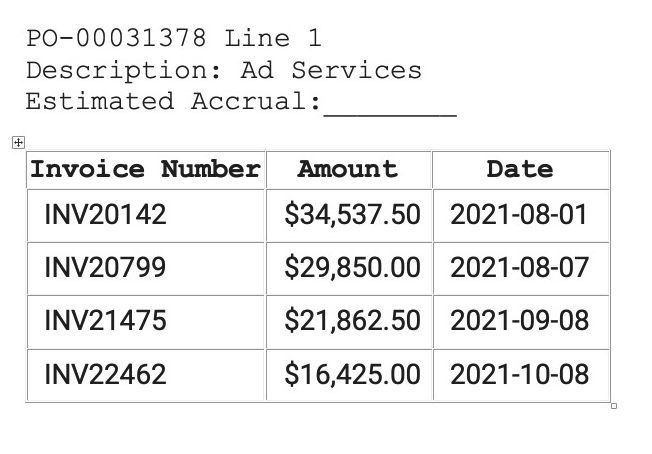
During the SmartGL flow, vendors now can enter an Estimated Accrual amount in the PO table. If there are no vendor invoices for a PO, a message will indicate There is no invoice for this PO.
SmartCollections: Support for On Premise ERPs [7308]
SmartCollections skills are now supported for on premise ERPs.

2. Fixed Bugs
Resolved: Test vendors received two reach out emails [8148]
Resolved: Tenant Load Number not in email template during test [8411]
Resolved: Bansal labour line not extracted from invoices [8291]
Resolved: AP Helpdesk: Load numbers not found repeated in SmartBot response [8281]

3. New Known Bugs
AP Helpdesk: Email template body missing the Load Number variable. [8411]
Symptom: For a mock tenant that uses Load Number, the existing email templates have the Load Number variable, but the email template body does not contain the variable.
Impact: Load Number cannot be added from email template.
Workaround: None.
SmartVendor: Cannot select new PO or PR data source. [8411]
Symptom: Once an Accruals SmartFlowSkill is running, you cannot subsequently select a new data source (PO or PR) or make changes to an existing data source.
Impact: Cannot update or select new data source.
Workaround: None.