


1. New and Updated Features
ERP Integration: On Demand ERP sync added [7593]
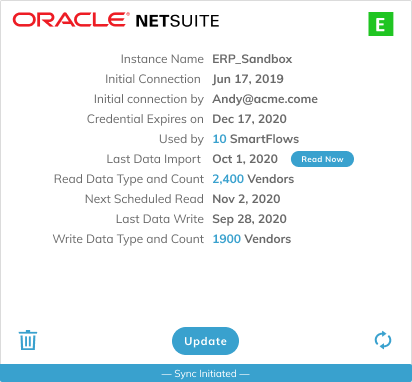
ERP administrators can perform an On Demand sync with the ERP by clicking the Read Now button in the ERP Connection Card.
Workday: Data mapping updates for customer teams [7278]
Data mapping for Oracle NetSuite has been enhanced to accommodate customer teams for Collections, Sales, and CSM.
SmartCollections: Predefined notes added to Customer Details [7158]
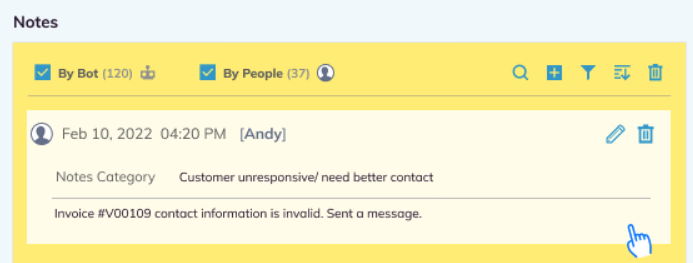
In the SmartCollections flow, predefined notes in a pulldown menu can be added to the Notes section for customer and vendor notes in the Autonomous Collector page. Up to 10 predefined notes are supported and an Auditoria Customer Success Representative gathers the notes and sets up the menu during implementation.
SmartCollections: Dunning category deletion supported [7016]
In the SmartCollections flow, when adding or editing dunning categories you can also remove categories when needed.
SmartBots: New email setting options [6530]
SmartBot email settings will mark received emails as Read or Unread.
Reports: Business Unit replaced with PO Line Description [7563]
For report data the metric Business Unit has been replaced with PO Line Description.
SmartCollections: Single dunning notice per day limit [6827]
In the SmartCollections flow, to avoid sending multiple dunning notices to a customer at once, the notices will be consolidated into one notice with a summary.

2. Fixed Bugs
Resolved: Received and Uploaded checkboxes not selected after W-9 upload [7902]
Resolved: Invoice Accrual: Vendor not viewable after editing [7894]
Resolved: W-9 reports data retained after SmartFlow stopped [7887]
Resolved: SmartCollections: Out of Office mails mislabeled as Update Contact Record [7869]
Resolved: All invoice numbers displaying in Notes [7865]
Resolved: AP Helpdesk: Prioritized Worklist card not deleted when SmartFlow stopped [7711]

3. New Known Bugs
Mailbox Connection: Tenant mailbox connections fail with error message [7771]
Symptom: For a demo tenant some mailbox connections fail and receive a Bad Request error message.
Impact: Demo tenant cannot connect mailboxes.
Workaround: None.
ERP Integration: Data written to ERP removed though SmartFlow not stopped [7773]
Symptom: Data written to the ERP is not retained in Auditoria even though the SmartFlow was not stopped.
Impact: Data written to ERP is not maintained.
Workaround: None.
SmartCollections: Multiple customer categories can be created with the same name [7841]
Symptom: During the SmartCollections process, multiple customer categories can be added with the same name if blank spaces are entered after the name. There should only be a single category for a specific name.
Impact: Customer Categories with identical names can be created.
Workaround: None.
Mailbox Connections: Collection Agent emails marked as Unknown Sender [7895]
Symptom: Emails from Collection Agents to Auditoria SmartBots are being processed and mistakenly labeled as Unknown Sender.
Impact: Collection Agent emails wrongly labeled.
Workaround: None.
Auditoria Notifications: Invalid grant email send by SmartBots [7899]
Symptom: An invalid email notification was sent to customers with the message Invalid_grant.
Impact: Customers receive invalid email from SmartBots.
Workaround: None.