

1. New and Updated Features
Collections SmartFlow: Open invoices in the generated account statement organized by Invoice Date [6116]
In the Collections SmartFlow, the generated account statement PDF organizes open invoices in order of the Invoice Date.
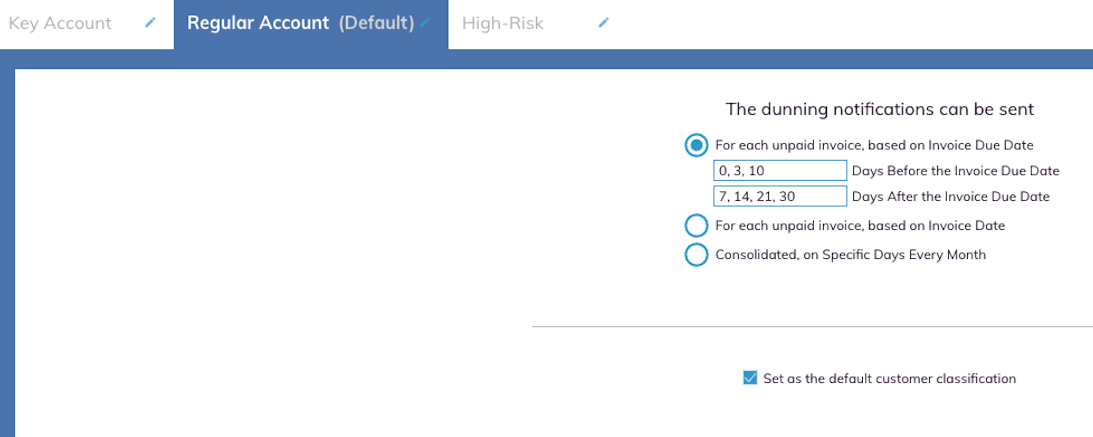
Collections SmartFlow: Select any available customer classification as the default when creating or editing a Collections SmartFlow [5976]
When creating or editing the Collections SmartFlow, you can select any of the available customer classifications as the default for the new SmartFlow. The example below shows the selected dunning notification cadence for a new or edited Collections SmartFlow.
Collections SmartFlow: Limits for the number of classifications and rules per tenant [5847]
In the Collections SmartFlow, limits are set for the number of classifications and rules per tenant. The following rules now apply to out of the box settings:
- Maximum number of 10 notices before the Due Date
- Maximum number of 10 notices after the Due Date
- Maximum number of 10 categories for a single SmartFlow
- The specific day dunning limit is increased from three days to 10 days
These settings can be overwritten by the tenant.
Vendor Invoice Data Extraction SmartFlow: Multiple line items for vendor invoices supported [5348]
During the Vendor Invoice Data Extraction SmartFlow, multiple line items in vendor invoices are now supported for data extraction.

2. Fixed Bugs
Resolved: Collections SmartFlow: Default customer classification not appearing on customer selection screen. [6156]
Resolved: Vendor Invoice Data Extraction SmartFlow: Single vendor invoice in multi-invoice page not processed during extraction. [6122]
Resolved: Workday Integration: Workday ERP not sync not completed as expected. [6055]
Resolved: Collections SmartFlow: Order of categories to be same when creating categories or selecting them for a template. [6049]
Resolved: Workday Integration: Open/Unpaid invoices not syncing with Workday ERP. [6004]
Resolved: Sage Intacct Integration: Manual refresh of Sage Intacct data has errors. [5965]
Resolved: Vendor Invoice Data Extraction SmartFlow: Multiple Otto vendor invoices not processed. [5889]
Resolved: Vendor Invoice Data Extraction SmartFlow: Otto known vendor invoice not recognized during extraction. [5577]
Resolved: Collections SmartFlow: User Inferface update for configuring Internal Contacts. [5010]

3. New Known Bugs
Collections SmartFlow: New customers enrolled via Priority Worklist Cards not showing classification as default category. [6213]
Symptom: During the Collections SmartFlow, after selecting the Set as the Default Customer Classification checkbox, new customers do not show the classification in the Customer Explorer section.
Impact: Customer does not view updated category for newly enrolled customers.
Workaround: None.
Workday Integration: Workday ERP sync with Auditoria taking over an hour to complete. [6207]
Symptom: During a manual refresh of Sage Intacct data to Auditoria, errors are created in the sync.
Impact: Customer cannot refresh Sage Intacct data.
Workaround: None.
Auditoria Action Log: Action log must say Customer Unenrolled when a customer is unenrolled. [6199]
Symptom: When the Action Log records the user action of unenrolling a customer, the status stays as Customer Enrolled.
Impact: Customer views incorrect data if unenrolling a customer.
Workaround: None.
Vendor Invoice Data Extraction SmartFlow : Priority Worklist Card shows sender email address when address is in the invoice. [6162]
Symptom: During the Vendor Invoice Data Extraction SmartFlow, the generated Priority Worklist Card shows the sender email address even though the sender email address is in the invoice.
Impact: Customer views two email addresses for sender.
Workaround: None.
Vendor Invoice Data Extraction SmartFlow: Folio3 new and updated invoices from Oracle NetSuite not processed by Auditoria during sync. [6100]
Symptom: During the Vendor Invoice Data Extraction SmartFlow, several new and updated invoices from Oracle NetSuite are not extracted and processed by Auditoria during a sync.
Impact: Customer not seeing new and updated invoices.
Workaround: None.
Collections SmartFlow: Maximum number of 10,000 customers showing on the Autonomous Collector page. [6139]
Symptom: During the Collections SmartFlow, a maximum number of 10, 000 customers appear on the Customer List in the Autonomous Collector page, even if there are more than 10,000 customers.
Impact: Customer does not view full list of customers.
Workaround: None.